## How to Build an AI Model From Scratch Using PyTorch
This is not a “build AI in 10 minutes” post.
This is not a copy-paste tutorial.
This is how you actually build an AI model — slowly, clearly, and without lying to yourself.
If you searched “how to build an AI model from scratch”, you’re in the right place.
### Table of Contents
- What Does “From Scratch” Mean in AI?
- What Is an AI Model? (Simple Explanation)
- Installing PyTorch
- Understanding Tensors in PyTorch
- Gradients and Autograd
- What Is a Neural Network?
- Loss Functions Explained
- Optimizers Explained
- The Training Loop
- Why AI Models Start Bad
- Evaluating a Model Properly
- Saving and Loading a PyTorch Model
- Common Beginner Mistakes
- What to Learn Next
- Final Thoughts
#### Technical Requirements & Setup (2026)
To follow this guide and begin building, ensure your environment meets these specifications:
| Component | Requirement | Purpose |
|---|---|---|
| Language | Python 3.10+ | Primary language for PyTorch support. |
| Core Library | torch, torchvision |
The engine for tensors and neural layers. |
| Hardware | NVIDIA GPU (Optional) | Speeds up training via CUDA. |
| Memory | 8GB RAM (Min) | Handles data batches and model parameters. |
| Dependencies | pip install torch |
Standard installation command. |

### What Does “From Scratch” Mean in AI?
Let’s be honest.
When most people say “from scratch”, they mean:
- imported a pre-trained model
- followed a tutorial blindly
- hoped it works
- closed the tab when it didn’t
That’s not what we’re doing.
#### From scratch means:
- You write the neural network yourself
- You understand tensors and gradients
- You control the training loop
- You know why the model learns
- You can debug when it breaks (it will)
We will use PyTorch, but only as a tool, not a brain replacement.
### What Is an AI Model? (Simple Explanation)
An AI model is not:
- intelligent
- conscious
- thinking
- alive
An AI model is:
- a bunch of numbers
- doing math
- trying to be less wrong over time
That’s it.
#### The Core Idea of Machine Learning
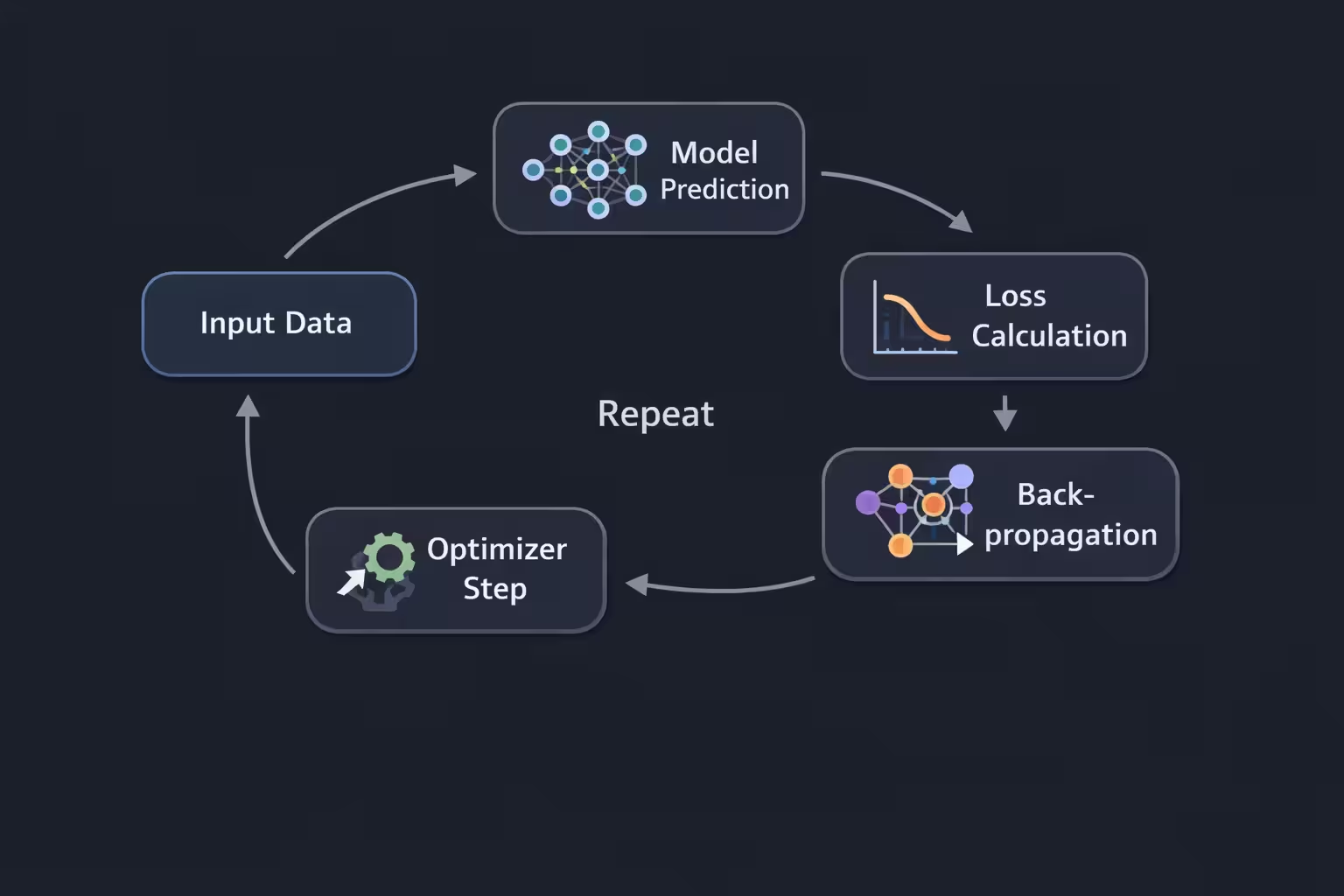
Every AI model ever made follows this loop:
Guess → Measure error → Adjust numbers → Repeat
That loop is learning.
### Installing PyTorch
Install PyTorch:
pip install torch torchvision torchaudioVerify installation:
import torch

print(torch.__version__)
print(torch.cuda.is_available())True→ GPU acceleration 🚀False→ CPU training (still works)
### Understanding Tensors in PyTorch
Everything in PyTorch is a tensor.
- 0D → number
- 1D → list
- 2D → table
- 3D → image
- 4D → batch of images
Example:
import torch

x = torch.tensor([1.0, 2.0, 3.0])
print(x)
Simple. Powerful. Dangerous.
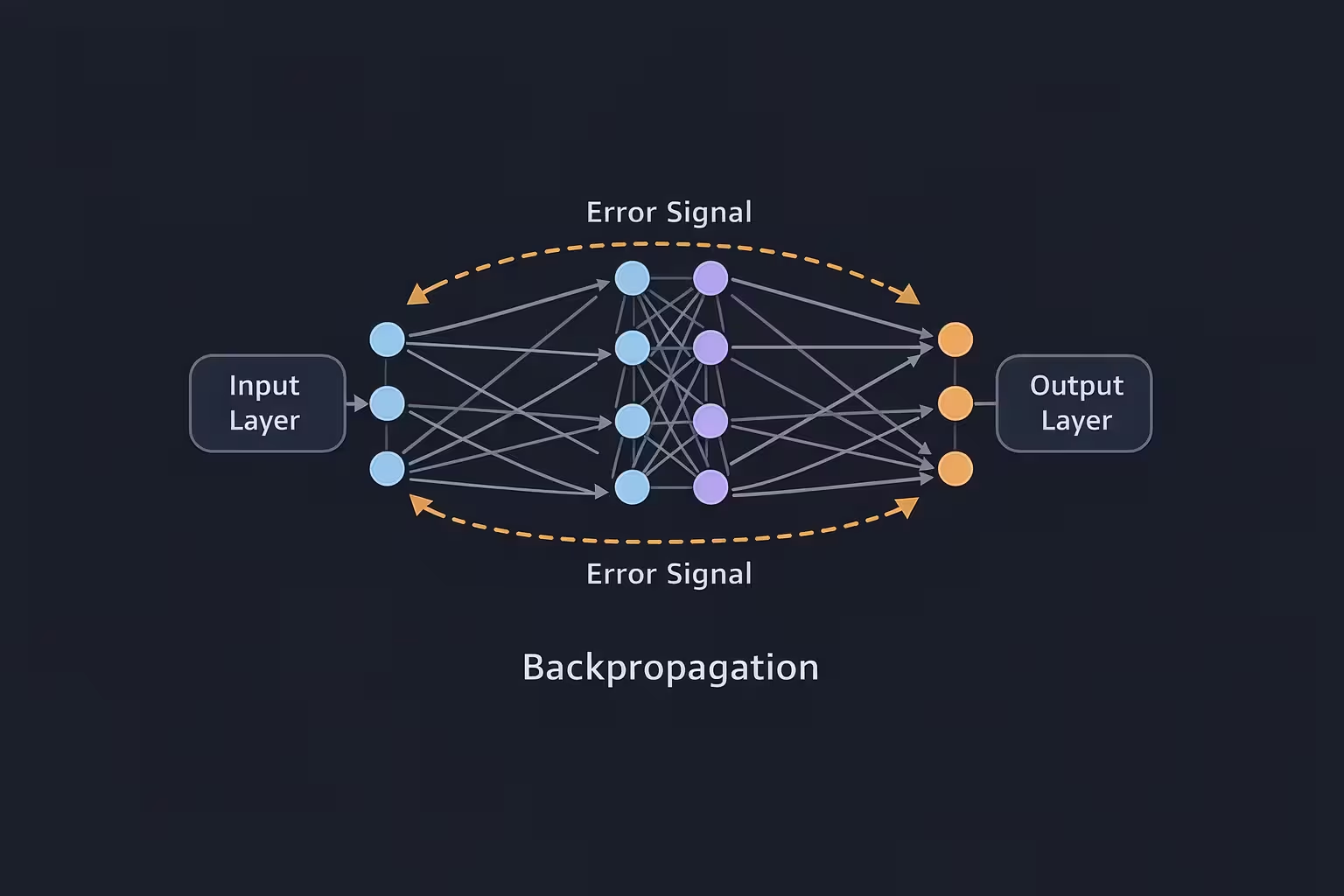
### Gradients and Autograd
A gradient answers one question:
“If I change this number slightly, does the result get better or worse?”
Example:
import torch

x = torch.tensor(2.0, requires_grad=True)
y = x ** 2
y.backward()

print(x.grad)
Output:
4PyTorch handles gradients using autograd.
You don’t do calculus. PyTorch does.
### What Is a Neural Network?
A neural network is just:
- input numbers
- multiplied by weights
- passed through functions
- repeated a few times
That’s literally it.
#### Creating a Neural Network in PyTorch
import torch.nn as nn

class SimpleNet(nn.Module):
    def __init__(self):
        super().__init__()
        self.fc1 = nn.Linear(10, 64)
        self.relu = nn.ReLU()
        self.fc2 = nn.Linear(64, 1)

    def forward(self, x):
        x = self.fc1(x)
        x = self.relu(x)
        x = self.fc2(x)
        return x
Human translation:
- Take 10 numbers
- Turn them into 64 features
- Remove negative vibes (ReLU)
- Output 1 number
You just built a neural network.
### Loss Functions Explained
The model predicts.
The loss function replies:
“Bro… that’s wrong.”
Example:
loss_fn = nn.MSELoss()Mean Squared Error punishes big mistakes hard — which helps learning.
### Optimizers Explained
The optimizer updates the model’s weights.
optimizer = torch.optim.Adam(
    model.parameters(),
    lr=0.001
)
Adam is popular because:
- stable
- fast
- beginner-friendly
### The Training Loop
This is where AI is actually created.
for epoch in range(100):
    optimizer.zero_grad()

    predictions = model(inputs)
    loss = loss_fn(predictions, targets)

    loss.backward()
    optimizer.step()

    print(f"Epoch {epoch} | Loss: {loss.item()}")
What happens every epoch:
- Clear old gradients
- Predict
- Measure error
- Backpropagate blame
- Update weights
Repeat.
### Why AI Models Start Bad
At the beginning:
- weights are random
- predictions are terrible
- loss is high
That’s normal.
Learning = controlled failure.
### Evaluating a Model Properly
model.eval()
with torch.no_grad():
    output = model(test_inputs)
Evaluation mode:
- disables randomness
- saves memory
- increases speed
### Saving and Loading a PyTorch Model
Save:
torch.save(model.state_dict(), "model.pt")Load:
model.load_state_dict(torch.load("model.pt"))
model.eval()
Your AI survived.
### Common Beginner Mistakes
- Learning rate too high → NaN loss
- Forgetting
zero_grad()→ broken training - No normalization → slow learning
- Training too long → overfitting
- Copy-paste learning → zero understanding
Mistakes are part of the process.
### What to Learn Next
- CNNs for images
- Transformers for text
- Custom datasets
- GPU training
- Writing your own layers
- Breaking models on purpose
### Final Thoughts
AI isn’t about being smart.
It’s about being stubborn enough to understand boring things deeply.
This website is for builders.
This is post #1.
Everything starts here.